Subtotal ₨ 0






Email :54
If you are wondering, “what are the essential steps for a beginner to start with search engine optimization?”, you’ve already taken the most important step—recognizing that SEO matters. Whether you’re running a small business blog, managing an e-commerce store, or building your online presence, learning the core fundamentals will completely transform how people discover your content online.
The truth is, you don’t need to be a technical wizard or invest immediately in an expensive SEO tool to see results. Basic SEO strategies are surprisingly straightforward once you understand the core concepts. This SEO guide breaks down a complex topic into manageable, actionable steps that anyone can implement today.
Many people assume that optimization requires extensive technical knowledge. This couldn’t be further from the truth. While optimization can get complex as you progress, the basics are accessible to everyone. Throughout this tutorial, you’ll discover that most successful websites started with someone who followed fundamental principles, learned from their mistakes, and continuously improved. If you’re ready to stop feeling overwhelmed and start seeing real results from organic search traffic, this step-by-step guide is designed specifically for you. Let’s dive into the foundational actions that will set your website up for long-term success.

Understanding What SEO Really Means
The Foundation: Why SEO Matters for Your Website
Before jumping into the technical how-to-start-SEO strategies, let’s make sure you understand why you’re doing this. SEO is simply the practice of optimizing your website so that search engines like Google can find it, understand it, and rank it for relevant searches. Think about your own behavior online—when you need something, you type it into Google, and you look at the first few results. Your customers are doing exactly the same thing. If your website doesn’t appear on that first page of Google results, you’re essentially invisible to potential customers.
The beauty of SEO is that it’s a long-term investment in your website. Unlike paid advertising where you stop getting traffic the moment you stop paying, SEO builds momentum over time. As your site gets more optimized, gains more authority, and appears for more relevant searches, the traffic keeps flowing. This makes learning SEO steps for beginners one of the smartest investments you can make for your online business. You’re not paying for clicks; you’re earning them by providing content that search engines and users genuinely find valuable.
The Complete Beginner SEO Strategy Framework
Step One: Understanding Your Website’s Current State
The first beginner SEO step is honest self-assessment. Before you start making changes, you need to understand where your website currently stands. Are you already getting any organic traffic? If so, which pages are performing well, and which are falling behind? Do you know what keywords people are using to find you? This might sound technical, but it’s actually quite simple—most of this information is available in Google Search Console, which is completely free.
Google Search Console is like a communication channel between you and Google. It shows you exactly what Google knows about your website, which keywords your pages are ranking for, how many clicks you’re getting, and what your average position is in search results. Spend time reviewing this data. If you haven’t set up Search Console yet, that’s literally your first action item. This foundational work takes maybe thirty minutes but gives you invaluable insights into your starting point. Understanding where you are now makes it much easier to measure progress later.
Step Two: Basic Keyword Research Steps for Beginners
You cannot succeed with search engine optimization for beginners without understanding keyword research. Keywords are the bridge between what people are searching for and your content. Your job is to figure out what your target audience is searching for and create content that answers their questions. This is where basic keyword research steps come in.
Start simple. Think about your business or topic. What would your ideal customer search for to find you? Write down fifteen to twenty potential keywords. For example, if you run a dog training business, your keywords might include “how to train a dog,” “dog training tips,” “puppy training basics,” and similar phrases. Once you have your list, use free tools like Google Keyword Planner or Ubersuggest to see how many people search for these terms monthly. Focus on keywords that have a decent search volume (at least a few hundred searches per month) but aren’t dominated by massive corporations. This is the sweet spot where beginners can realistically rank and drive traffic.
On-Page SEO Basics: The Foundation of Ranking
Optimizing Your Page Title and Meta Description
One of the most important on-page SEO basics is optimizing your title tags and meta descriptions. Your title tag is the clickable headline that appears in Google search results. Your meta description is the short preview text below it. These two elements are crucial because they’re often the deciding factor in whether someone clicks on your link or your competitor’s link.
When writing title tags, include your target keyword naturally. Instead of “Blog Post,” write something like “How to Train Your Dog: Complete Beginner’s Guide.” This tells both Google and potential visitors what your page is about. Keep it under 60 characters so it doesn’t get cut off in search results. For meta descriptions, write a compelling summary of what the page contains, include your keyword naturally, and keep it between 150-160 characters. Think of the meta description as your sales pitch—make it interesting enough that someone actually wants to click.
Crafting Keyword-Rich Headings and Content Structure
When you’re learning how to start SEO for beginners, understanding proper heading structure is essential. Headings help both search engines and users understand the hierarchy and organization of your content. Use one H1 heading per page (your main title), then use H2 headings for major sections and H3 headings for subsections. This creates a logical structure that makes content easier to read and helps search engines understand your page’s topic.
Your content itself should naturally incorporate your target keywords without forcing them in awkwardly. If your keyword is “beginner SEO steps,” you should use it in your headings, your first paragraph, and a few times throughout the content—but only when it makes sense. Write for humans first, search engines second. The best content doesn’t read like it’s been keyword-stuffed; instead, it flows naturally while incorporating relevant search terms. Aim for a keyword density of around 1-2 percent, meaning your target keyword appears once or twice for every 100 words.
Creating Valuable, Long-Form Content
One truth that applies to all beginner SEO strategy is that longer content typically ranks better. This doesn’t mean writing fluff just to hit a word count—it means being thorough. When you cover a topic comprehensively, you naturally include more information, more keywords, and more reasons for people to find your content valuable. Aim for content that’s at least 1,500-2,000 words if you’re trying to rank for competitive keywords.
But here’s the crucial part: every single paragraph should provide value to your reader. Don’t add content just for SEO purposes. Ask yourself, “Does this paragraph help the person reading this article?” If the answer is no, remove it. The best content serves both human readers and search algorithms naturally. When you write helpful content that thoroughly addresses a topic, you’ll naturally include semantic keywords, answer common questions, and provide the kind of information that earns rankings and keeps readers engaged.
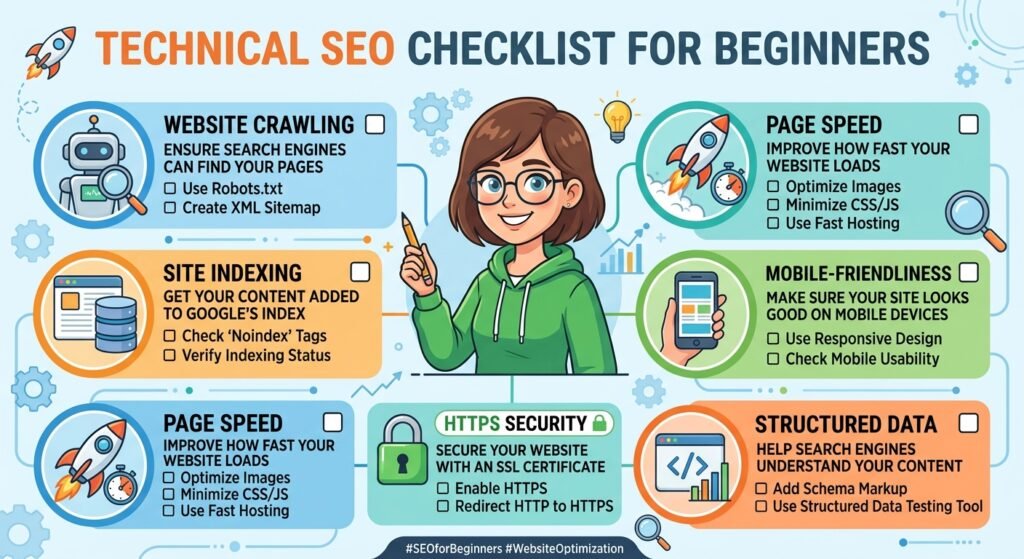
Technical SEO Checklist for Beginners
Website Speed and Mobile Responsiveness
When starting with search engine optimization for beginners, technical SEO might seem intimidating, but the most important technical factors are surprisingly simple. First is website speed. Google cares about how fast your website loads because users care about it. If your site takes forever to load, people bounce away before it even finishes loading. You can check your site speed using Google PageSpeed Insights, which is free and even tells you specific improvements to make.
Most hosting companies today use content delivery networks (CDNs) that automatically speed up your site. If your site is slow, talk to your hosting provider. Often, upgrading to better hosting or enabling caching features can dramatically improve speed. Second is mobile responsiveness. Most people now access the internet on their phones, and Google actually uses mobile performance as the primary ranking signal. If your website looks terrible on phones, you’re already losing in the rankings. Check if your site is mobile-friendly using Google’s Mobile Friendly Test tool.
Fixing Technical Errors and Site Structure
A basic SEO checklist for beginners should include an audit of technical errors. These might include broken links (links that lead to 404 errors), duplicate content, or pages that aren’t indexed by Google. Again, Google Search Console tells you about most of these issues. Review the reports in Search Console at least monthly. If you see errors, address them. Most are straightforward to fix or aren’t actually problems—Search Console explains what each error means and how to fix it.
Your site structure also matters. Organize your content into logical categories. If you have a blog, create categories and use menus to help people navigate. A clear site structure helps both users and search engines understand your content hierarchy. Think of it like organizing a physical library—information should be easy to find because everything is organized logically.
Building Authority: Links and Content Strategy
Understanding Internal and External Links
Learning SEO from scratch includes understanding links. Links are like votes of confidence. When other websites link to your content, Google interprets this as a sign that your content is valuable. Building these “backlinks” is one of the biggest challenges in SEO, but beginners often overlook a simpler type of linking—internal links.
Internal links are links from one of your pages to another of your pages. These are completely in your control. When you write new content, link to relevant older content on your site. This helps Google discover and understand your site structure and tells Google which pages are most important. For example, if you write an article about “beginner SEO steps,” you might link to your article about “basic keyword research steps.” This internal linking strategy improves your SEO while also helping readers find related content.
Building External Links (Backlinks)
Getting other websites to link to your content is challenging, but it’s how you build real authority. Start by reaching out to people who might naturally want to link to your content. If you write a comprehensive guide, mention it in relevant forums, social media communities, and discussions. Comment on other blogs with genuine, helpful comments that include a link back to relevant content on your site. Guest post on other websites in your industry—this not only earns you a backlink but also exposes your expertise to new audiences.
Another strategy is broken link building. Find websites in your niche that link to resources that no longer exist (broken links). Create a better version of that content on your site, then contact the website owner and suggest they link to your content instead. This helps them improve their site quality while earning you a backlink. Building backlinks takes time and consistent effort, but it’s one of the most powerful ranking factors in SEO.
A Beginner SEO Strategy: Your Step-by-Step Implementation Timeline
| Week | Key Actions | Focus Area |
|---|---|---|
| Week 1-2 | Set up Google Search Console, Google Analytics, and audit current state | Foundation & Analysis |
| Week 3-4 | Conduct keyword research, identify primary and secondary keywords | Keyword Research |
| Week 5-6 | Optimize existing high-value pages (titles, meta descriptions, headings) | On-Page SEO Basics |
| Week 7-8 | Create or update content pillars with comprehensive, keyword-rich articles | Content Creation |
| Week 9-10 | Build internal linking structure between related pages | Site Architecture |
| Week 11-12 | Submit sitemap to Search Console, monitor search rankings, start backlink outreach | Submission & Monitoring |
Creating a Basic SEO Guide for Your Specific Niche
Identifying Your Competitor’s Strategies
Part of your beginner SEO strategy should include analyzing what your competitors are doing. This doesn’t mean copying them—it means learning from them. Identify your top three to five competitors and visit their websites. What keywords are they targeting? What type of content are they creating? Which of their pages get the most backlinks? Free tools like MozBar and SEMrush’s free tier can give you this information.
Look for gaps in their strategy. What topics aren’t they covering? What keywords aren’t they targeting? These gaps represent opportunities for you. If all your competitors have bloated, slow websites, your fast, user-friendly site becomes a competitive advantage. If they’re only publishing 500-word blog posts, your comprehensive 2,000-word guides stand out. Your job is to find these advantages and exploit them.
Content Planning That Actually Drives Results
Before you start writing random blog posts, create a content plan. Map out your target keywords to content pieces. Create pillar content—comprehensive guides that cover a broad topic. Then create supporting content that covers related subtopics and links back to your pillars. This is called topic clustering, and it’s one of the most effective content strategies for how to start SEO for beginners.
For example, if your pillar keyword is “beginner SEO steps,” you might create supporting articles about “on-page SEO basics,” “basic keyword research steps,” “technical SEO checklist for beginners,” and so on. Each supporting article links back to the pillar article, which strengthens the pillar’s authority on that topic. This organized approach to content planning is far more effective than randomly publishing articles without a strategy.
Do’s and Don’ts: Common Beginner SEO Mistakes
As you begin your journey with search engine optimization for beginners, avoiding common pitfalls will accelerate your results significantly. Below is a practical guide to what successful beginners do versus what holds them back.
| Do’s ✅ | Don’ts ❌ |
|---|---|
| Focus on creating genuinely helpful, valuable content first | Obsess over keyword rankings while ignoring user experience |
| Optimize your site for actual humans before worrying about algorithms | Stuff keywords unnaturally into your content (keyword stuffing) |
| Build your SEO gradually and sustainably over months and years | Expect overnight results or use black-hat techniques promising quick rankings |
| Monitor your progress using Google Search Console and Analytics | Ignore data and make changes based on guesses instead of metrics |
| Update and improve existing content to maintain relevance | Create content once and never touch it again |
| Use descriptive, keyword-rich titles that accurately reflect your content | Create clickbait titles that don’t match your actual content |
| Make your site mobile-friendly and fast-loading | Ignore mobile users or allow slow site speed issues |
| Learn continuously and stay updated on SEO changes | Assume you learned everything and never adapt your strategy |
On-Page SEO Basics: The Comprehensive Checklist
URL Structure and Image Optimization
Your URL structure contributes to SEO more than most beginners realize. Use descriptive, keyword-relevant URLs instead of random characters or numbers. Instead of yoursite.com/page123, use yoursite.com/how-to-start-seo. Short, descriptive URLs are easier to read, share, and understand. They also give search engines another signal about your page’s topic.
Images are another often-overlooked SEO opportunity. Use high-quality images in your content—they improve user engagement. But don’t forget image alt text. Alt text serves multiple purposes: it describes the image for visually impaired users, it helps search engines understand what the image is about, and it can display if the image fails to load. Write descriptive alt text that includes relevant keywords naturally. For example, instead of “image1.jpg,” use alt text like “beginner SEO strategy diagram showing the content optimization process.”
Internal Linking Strategy and User Engagement Signals
Your internal linking strategy is part of on-page SEO basics that beginners often neglect. When you link to other pages on your site, use descriptive anchor text (the clickable text of the link) that includes your target keyword. Instead of linking with text that says “click here,” use text like “learn our beginner SEO strategy” or “read our SEO checklist for beginners.” This tells both users and Google what the linked page is about.
User engagement signals also matter more than people realize. Metrics like time on page, bounce rate, and scroll depth all influence rankings. If people land on your page and immediately leave (high bounce rate), Google assumes your content isn’t satisfying user intent. To improve engagement, write compelling introductions that make people want to keep reading. Use subheadings to break up long text. Include relevant images and videos. Format your content for easy scanning. These user experience improvements boost your SEO while making your content better for humans.
Measuring Progress: Analytics and Reporting
Using Google Analytics to Track Your Success
Once you’ve implemented beginner SEO steps, how do you know if they’re working? Google Analytics is your answer. This free tool shows you detailed information about your website traffic. It tells you which pages are getting the most traffic, where that traffic is coming from, how long people spend on your site, and whether they’re taking desired actions (like subscribing, making a purchase, or filling out a form).
Set up goals in Google Analytics. If you want people to subscribe to your email list, create a goal for that. If you want people to view a particular page, create a goal. Once you have goals set up, you can see which traffic sources (organic search, social media, direct, etc.) lead to the most goal completions. This helps you understand the real ROI of your SEO efforts. It’s not just about traffic—it’s about traffic that converts.

Creating a Basic SEO Checklist to Track Progress
As you implement your beginner SEO strategy, create a checklist to track your progress. This keeps you accountable and ensures you’re not forgetting important steps. Your SEO checklist for beginners might include items like: “Set up Google Search Console,” “Conduct initial keyword research,” “Optimize page titles and meta descriptions,” “Create internal linking structure,” “Submit sitemap,” “Build first backlinks,” and “Monitor rankings monthly.”
Review this checklist monthly. Check off what you’ve completed, identify what still needs work, and plan your priorities for the next month. SEO is a marathon, not a sprint. By systematically working through your checklist and continuously implementing improvements, you’ll make steady progress. Six months from now, your traffic will likely be substantially higher than it is today. A year from now, you might look back amazed at how far you’ve come.
Recommended Resources for Learning SEO from Scratch
Free Tools and Resources
The best news about learning search engine optimization for beginners is that you don’t need to spend money on expensive courses or software initially. Google provides several free tools that are incredibly powerful. Google Search Console, Google Analytics, and Google Keyword Planner are the holy trinity of free SEO tools. Google also publishes a comprehensive SEO starter guide that’s excellent for beginners.
For additional learning, visit https://moz.com/beginners-guide-to-seo where you’ll find Moz’s excellent beginner’s guide. This resource covers SEO fundamentals in an accessible, understandable way. Moz also publishes the “Whiteboard Friday” series—short, engaging videos explaining SEO concepts. Another excellent free resource is the Google Search Central blog (https://developers.google.com/search) which provides official updates about how Google works and what they recommend for website optimization.
Building Your Knowledge Over Time
Learning SEO from scratch isn’t something you do in a week or two. It’s an ongoing process. Follow SEO blogs, listen to SEO podcasts, and stay curious about how search works. The algorithm changes periodically, and staying informed helps you adapt your strategy. However, don’t get distracted by the latest SEO trends—the fundamentals (great content, technical excellence, building authority) never change.
Conclusion: Your SEO Journey Begins Today
You now have a comprehensive understanding of essential SEO steps for beginners. You know what SEO is, why it matters, and the specific beginner SEO steps you need to implement. You understand basic keyword research steps, on-page SEO basics, technical requirements, and how to build authority. Most importantly, you have a practical roadmap for how to start SEO for beginners that doesn’t require advanced technical skills or expensive tools.
The beautiful truth about search engine optimization for beginners is that you don’t need to know everything to get started. You just need to know enough to take action. Start this week. Set up Google Search Console. Do basic keyword research. Optimize your most important pages. These early steps might feel small, but they compound over time. Three months from now, you’ll see traffic increases. Six months from now, you’ll wonder why you didn’t start sooner.
Remember, every website that’s ranking well for competitive keywords started exactly where you are now. The difference between sites that rank and sites that don’t isn’t advanced SEO knowledge—it’s consistent implementation of basic SEO guide principles. You now have that knowledge. You have a search engine optimization tutorial you can reference. You have a clear beginner SEO strategy to follow. All that’s left is to take action. Your journey to organic search success starts today with the essential steps for a beginner to start with search engine optimization.